If you are a Tilt Practitioner and purchasing assessment(s) for client(s) these are the steps:
At tilt365.com click the My Dashboards / Assessments drop-down menu in the upper right corner to login.
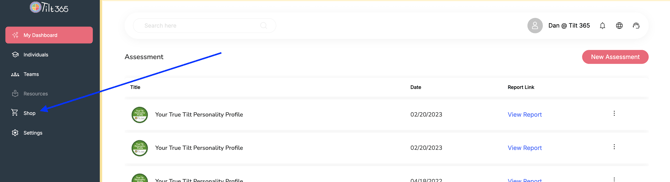
From your Dashboard, click the Shop menu at the left side of the screen.
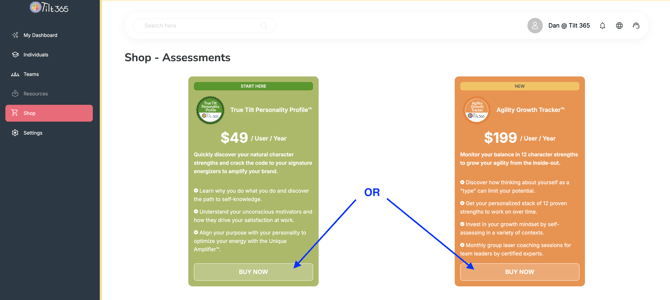
Select the assessment product (True Tilt Profile or Agility Growth Tracker).
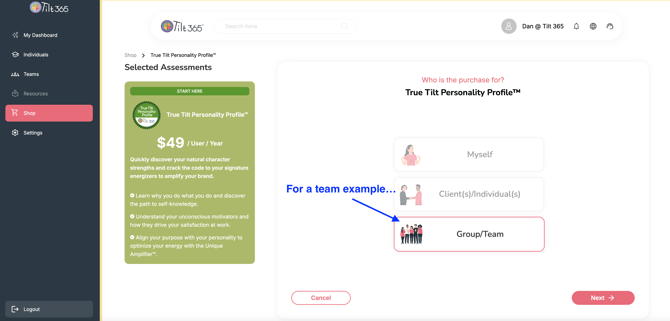
Select "who's it for?" (either Individuals or a Group/Team).
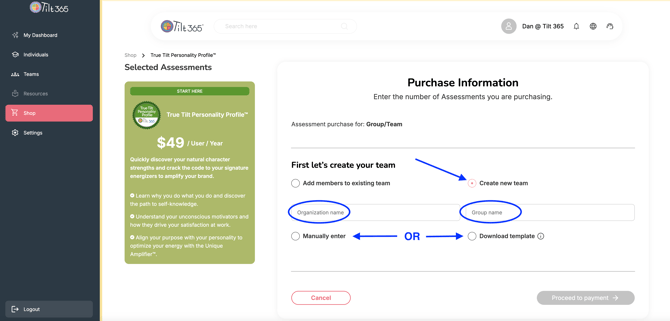
For a Team example, on the next page enter the Organization and Team name and select if you'll be manually entering them (number of participants, up to 20 max...) or uploading a roster via our spreadsheet template that is downloaded first and then populated to upload back into the system...
Proceed through the purchase flow and each participant immediately receives an automated email invite with an embedded link to complete their assessment and because they are purchased from your Tilt Dashboard their report links will populate within the team folder as soon as an assessment is completed...
When assessments are purchased as a Group/Team a Team Climate composite visual and roster listing by Tilt result is also provided.